Seven playing voices
Start with Clean DI, Vintage Tube, Modern Punch, Rock Drive and Warm Studio, plus the original Roundabout Edge and Northern Growl character patches.

YOUR GROOVE. YOUR LOW END.
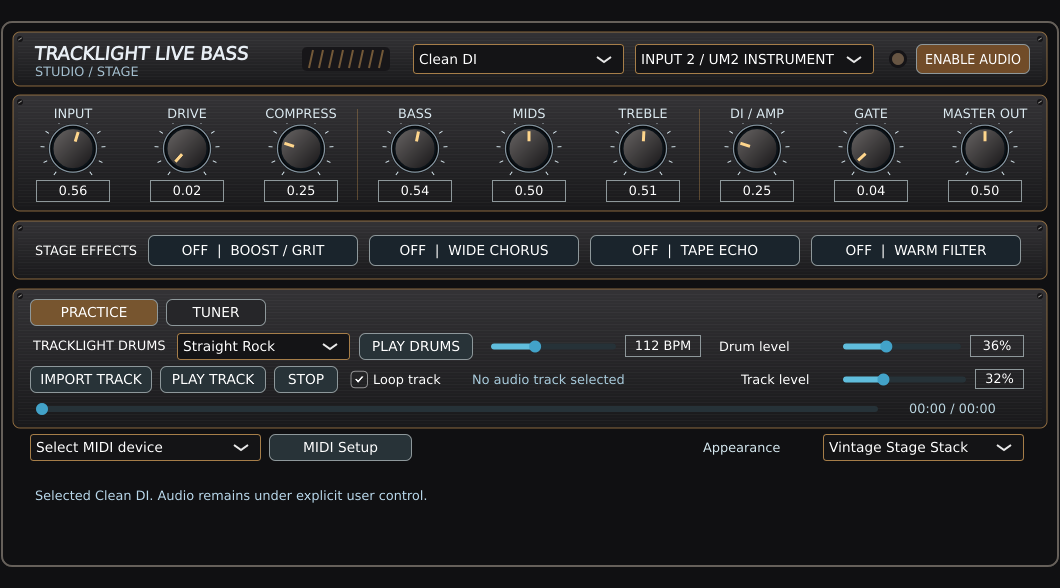
Build a bass rig you can dial in at a glance. Blend DI and amp tone, set compression and EQ, switch four stage effects, and play along with built-in drums or your own jam track.
The standalone rig is in development testing. The screenshot shows the current playing layout with MIDI Learn tucked into MIDI Setup.
Release timing, pricing and final system requirements have not been announced.
MADE FOR MUSIC IN THE MOMENT
Set a tone you enjoy playing, then hear how it sits against a drum groove or backing track. The amp controls and effects stay in view while you practice.
WHAT MAKES IT TRACKLIGHT
Start with Clean DI, Vintage Tube, Modern Punch, Rock Drive and Warm Studio, plus the original Roundabout Edge and Northern Growl character patches.
Dial input, drive, compression, bass, mids, treble, DI/amp blend, output and gentle gate from one focused panel.
Standalone low-latency audio design with manually enabled audio, selectable instrument input and output protection.
Build your drums in Drum Machine, capture the low end, and bring the arrangement into TrackLight DAW.
Mac first-sound audition was successful. Headphone listening, complete preset comparisons and Windows device testing are still in progress.
MIDI footboard mapping is available in the development build. Expanded amp models, DAW recording integration and tablet controls are roadmap items.
FROM THE DEVELOPMENT STUDIO
Development testing covers bass tone, MIDI mapping, effects, practice playback and the tuner. Retail availability will be announced after testing.
Artist-inspired tone descriptions refer to original sound design, not official artist collaborations or endorsements.
The feature breakdown
Made by musicians for musicians
Start with Funk Pocket or Blues Shuffle, set a comfortable tempo, and practice placing the note around the kick.
Import a backing track, set its level, and map the effects you need to your footboard.
Try Clean DI for definition, then audition Modern Punch or Roundabout Edge against the same groove.
Yes. Import a drum loop or jam track, then use the player’s looping, seek, and independent track level controls.
Use MIDI Setup to assign a supported controller to knobs or effects. Close setup when you finish. Your saved assignments stay active.
The cabinet appearance is visual. Use the DI/amp blend, EQ, compression and effects to shape the bass tone.
NOVEMBER 2026 DEVELOPMENT UPDATE
The Intel Mac Live Bass standalone tests passed, including its finished hardware-inspired skin, practice drum player, tuner, MIDI mapping and recording into TrackLight DAW. The bass tone was retained when the separate Live Bass app was closed after recording. Installer, serial and independent update verification remain pre-release work.
These are active development and beta-testing capabilities, not a retail availability announcement. Product-specific installers, serial activation, platform compatibility and updates must be verified before launch.
Get product launch updates ↗BE FIRST TO HEAR
Get an email when TrackLight Live – Bass is ready for retail availability. We will also send relevant availability updates for this product.
No purchase required. Pricing, release date and supported platforms will be announced when confirmed.
KEEP CREATING